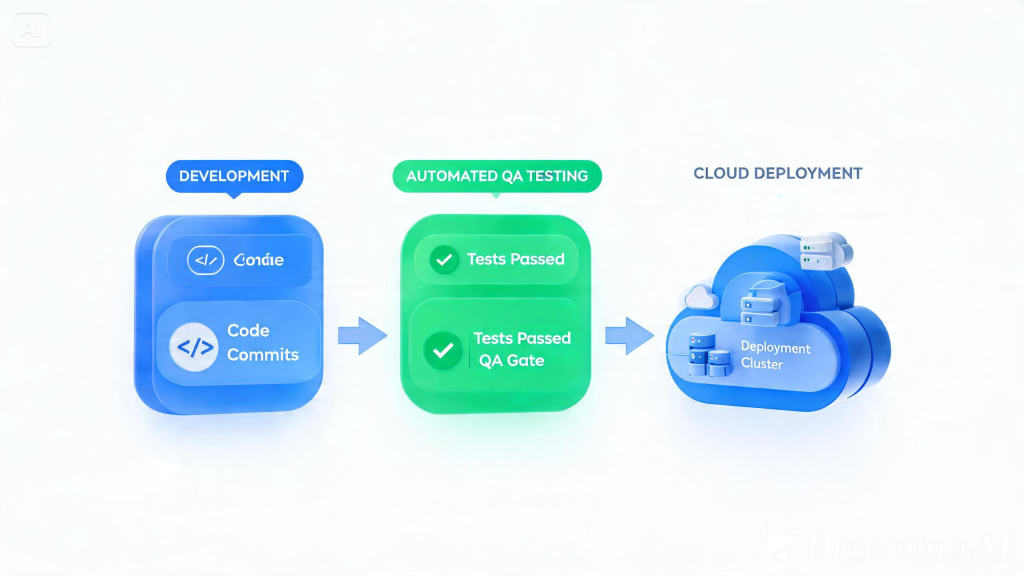
O Que é CI/CD?
Continuous Integration (CI)
Desenvolvedores commitam código frequentemente (diariamente ou mais). Cada commit triggers build automático e suite de testes.
Continuous Delivery (CD)
Código que passa em todos os testes é automaticamente deployado para staging/produção.
GitHub Actions
Estrutura Básica
# .github/workflows/ci.yml
name: CI Pipeline

on:
  push:
    branches: [main, develop]
  pull_request:
    branches: [main]

env:
  NODE_VERSION: '18'

jobs:
  lint:
    runs-on: ubuntu-latest
    steps:
      - uses: actions/checkout@v4

- name: Setup Node
        uses: actions/setup-node@v4
        with:
          node-version: ${{ env.NODE_VERSION }}
          cache: 'npm'

- name: Install dependencies
        run: npm ci

- name: Run linter
        run: npm run lint

- name: Run type check
        run: npm run type-check

test:
    needs: lint
    runs-on: ubuntu-latest
    services:
      postgres:
        image: postgres:15
        env:
          POSTGRES_DB: test
          POSTGRES_USER: test
          POSTGRES_PASSWORD: test
        ports:
          - 5432:5432
        options: >-
          --health-cmd pg_isready
          --health-interval 10s
          --health-timeout 5s
          --health-retries 5

redis:
        image: redis:7
        ports:
          - 6379:6379

steps:
      - uses: actions/checkout@v4

- name: Setup Node
        uses: actions/setup-node@v4
        with:
          node-version: ${{ env.NODE_VERSION }}
          cache: 'npm'

- name: Install dependencies
        run: npm ci

- name: Run unit tests
        run: npm run test:unit -- --coverage

- name: Run integration tests
        env:
          DATABASE_URL: postgresql://test:test@localhost:5432/test
          REDIS_URL: redis://localhost:6379
        run: npm run test:integration

- name: Upload coverage
        uses: codecov/codecov-action@v3
        with:
          files: ./coverage/lcov.info
          fail_ci_if_error: true

e2e:
    needs: test
    runs-on: ubuntu-latest
    if: github.event_name == 'push'

steps:
      - uses: actions/checkout@v4

- name: Setup Node
        uses: actions/setup-node@v4
        with:
          node-version: ${{ env.NODE_VERSION }}

- name: Install dependencies
        run: npm ci

- name: Install Playwright
        run: npx playwright install --with-deps

- name: Run E2E tests
        run: npm run test:e2e

- name: Upload test results
        uses: actions/upload-artifact@v4
        if: always()
        with:
          name: playwright-report
          path: playwright-report/

security:
    needs: test
    runs-on: ubuntu-latest
    steps:
      - uses: actions/checkout@v4

- name: Run Snyk
        uses: snyk/actions/node@master
        env:
          SNYK_TOKEN: ${{ secrets.SNYK_TOKEN }}

- name: Run SonarCloud
        uses: SonarSource/sonarcloud-github-action@master
        env:
          SONAR_TOKEN: ${{ secrets.SONAR_TOKEN }}

deploy-staging:
    needs: [test, security, e2e]
    runs-on: ubuntu-latest
    if: github.ref == 'refs/heads/develop'
    environment: staging

steps:
      - uses: actions/checkout@v4

- name: Deploy to Staging
        run: |
          echo "Deploying to staging..."
          kubectl apply -f k8s/staging/

- name: Smoke tests
        run: |
          sleep 30
          curl -f https://staging.exemplo.com/health

deploy-production:
    needs: [deploy-staging]
    runs-on: ubuntu-latest
    if: github.ref == 'refs/heads/main'
    environment: production

steps:
      - uses: actions/checkout@v4

- name: Deploy to Production
        run: |
          echo "Deploying to production..."
          kubectl apply -f k8s/production/
GitLab CI
# .gitlab-ci.yml
stages:
  - lint
  - test
  - security
  - deploy

variables:
  NODE_VERSION: '18'
  POSTGRES_DB: test
  POSTGRES_USER: test
  POSTGRES_PASSWORD: test

lint:
  stage: lint
  image: node:$NODE_VERSION
  before_script:
    - npm ci
  script:
    - npm run lint
    - npm run type-check
  allow_failure: false

test:unit:
  stage: test
  image: node:$NODE_VERSION
  services:
    - postgres:15
  before_script:
    - npm ci
  script:
    - npm run test:unit -- --coverage
  coverage: '/Liness:s(d+.d+){6727d158e4474b0847515bd23a8ee4bebd5f1aac7a18bc968e51d8985dccb442}/'
  artifacts:
    reports:
      junit: junit.xml
      coverage_report:
        coverage_format: cobertura
        path: coverage/cobertura-coverage.xml

test:integration:
  stage: test
  image: node:$NODE_VERSION
  services:
    - postgres:15
    - redis:7
  before_script:
    - npm ci
  script:
    - npm run test:integration
  dependencies:
    - test:unit

test:e2e:
  stage: test
  image: node:$NODE_VERSION
  before_script:
    - npm ci
    - npx playwright install --with-deps
  script:
    - npm run test:e2e
  dependencies:
    - test:integration
  allow_failure: true

security:dependency-scanning:
  stage: security
  image: alpine:latest
  before_script:
    - apk add --no-cache curl
  script:
    - curl -sL https://getsentry.com/snippets/snyk-gitlab.sh | bash

deploy:staging:
  stage: deploy
  script:
    - echo "Deploying to staging"
    - kubectl config use-context staging
    - kubectl apply -f k8s/staging/
  environment:
    name: staging
  only:
    - develop

deploy:production:
  stage: deploy
  script:
    - echo "Deploying to production"
    - kubectl config use-context production
    - kubectl apply -f k8s/production/
  environment:
    name: production
  when: manual
  only:
    - main
Quality Gates
Implementação
quality-gates:
  stage: quality
  image: node:$NODE_VERSION
  before_script:
    - npm ci
  script:
    - |
      # Check coverage
      COVERAGE=$(cat coverage/coverage.json | jq '.total.lines.pct')
      echo "Coverage: $COVERAGE{6727d158e4474b0847515bd23a8ee4bebd5f1aac7a18bc968e51d8985dccb442}"

if (( $(echo "$COVERAGE < 80" | bc -l) )); then
        echo "Coverage below 80{6727d158e4474b0847515bd23a8ee4bebd5f1aac7a18bc968e51d8985dccb442} threshold"
        exit 1
      fi

# Check test pass rate
      PASS_RATE=$(cat test-results.json | jq '.passed / .total * 100')
      echo "Pass rate: $PASS_RATE{6727d158e4474b0847515bd23a8ee4bebd5f1aac7a18bc968e51d8985dccb442}"

if (( $(echo "$PASS_RATE < 95" | bc -l) )); then
        echo "Pass rate below 95{6727d158e4474b0847515bd23a8ee4bebd5f1aac7a18bc968e51d8985dccb442} threshold"
        exit 1
      fi

# Check security
      if grep -q "high|critical" security-report.json; then
        echo "Security vulnerabilities found"
        exit 1
      fi

echo "All quality gates passed"
  needs:
    - test
  allow_failure: false
Test Reports
JUnit XML Format
assert 'token' not in response
GitHub Actions Upload
- name: Upload JUnit test results
uses: actions/upload-artifact@v4
with:
name: test-results
path: test-results/junit.xml
- name: Publish Test Results
uses: dorny/test-reporter@v1
with:
name: Test Results
path: test-results/*.xml
reporter: java-junit
fail-on: test failures
Conclusão
CI/CD robusto é essencial para QA moderno. As chaves são:
- Automação completa – Build, test, deploy
- Quality gates – Critérios objetivos para avançar
- Feedback rápido – Resultados em minutos
- Parallel execution – Speed up pipelines
- Reliable reporting – JUnit XML, cobertura, etc.